

私がWordPressのテーマを初めて作ったのが2013年あたりでした。当時はREST APIなどはなく、XMLRPCがある位でした。それから早幾年、2025年現在、様々なことが変わりました。query_postsが絶対非推奨になったとか、WP_Queryを使いなさいとか様々変わり、もうよくわからないというのが正直なところではあります。そんな中でセキュリティ的に一つ気になったのが、見出しのREST APIとXMLRPCの話でした。
◇ 塞ぐ?塞がない?

記事によって解説していることは全く異なります。ある記事では「REST APIは公開しておくべき」とあれば、海外のセキュリティ系のサイトでは「少なくともusersだけは塞ぐべきだ」などと、千差万別です。正直なところ私のサイトなんかはnode.jsを使ってるわけでもなければ、WordPressの投稿アプリを使うこともないし、ユーザー一覧が取られるのも気持ち悪いなーというのが正直なところでしたので、テーマに介入、functions.phpで強制的に制限できるようにしました。というわけでソースコードを公開します。
※10/6追記
プラグイン化しました。結局functions.phpに追記してもそのうちアップデートで消えるので。
※11/5追記
プラグイン掲載に伴いDLリンク変更。こちら(WordPress.org)からダウンロードしてください。
<?php
/**
 * Plugin Name: REST API Shield & XML-RPC Blocker
 * Description: A security plugin that controls XML-RPC access and specific WordPress REST API endpoints from anonymous users.
 * Plugin URI: https://p-fox.jp/blog/archive/367/
 * Version: 1.0
 * Author: Red Fox(team Red Fox)
 * Author URI: https://p-fox.jp/
 * Contributors: teamredfox
 * License: GPLv2 or later
 * License URI: http://www.gnu.org/licenses/gpl-2.0.html
 * Text Domain: rest-api-shield-xml-rpc-blocker
 * Requires at least: 6.8
 * Requires PHP: 7.4
 */

// 直接ファイルにアクセスされた場合の保護
if ( ! defined( 'ABSPATH' ) ) {
    exit;
}

/**
 * =========================================================
 * PART 1: XML-RPC コントロール機能
 * =========================================================
 */

/**
 * WordPress XML-RPC ブロッカー (設定で制御可能)
 *
 * @param bool $enabled 現在のXML-RPC有効/無効ステータス
 * @return bool
 */
function wpashield_control_xmlrpc_status( $enabled ) {
    $is_block_enabled = get_option( 'wpashield_block_xmlrpc' );

    if ( $is_block_enabled === '1' ) {
        return false;
    }

    return $enabled;
}
add_filter( 'xmlrpc_enabled', 'wpashield_control_xmlrpc_status' );

/**
 * XML-RPCリクエストが有効な場合、設定されたエラーコードとメッセージでアクセスを終了させる
 */
function wpashield_block_xmlrpc_prank() {
    $is_block_enabled = get_option( 'wpashield_block_xmlrpc' );
    $raw_error_code   = get_option( 'wpashield_xml_error_code', '403' );
    $is_error_code    = absint( $raw_error_code );

    // XML-RPCリクエストであり、かつブロックが有効化されている場合のみ実行
    if ( defined( 'XMLRPC_REQUEST' ) && XMLRPC_REQUEST && $is_block_enabled === '1' ) {

        status_header( $is_error_code );

        $custom_error_message = get_option('wpashield_xml_error_message');
        $default_message = __( "Access is denied. It is part of our efforts to prevent information leaks.", 'rest-api-shield-xml-rpc-blocker' );

        $error_message = empty($custom_error_message)
                        ? $default_message
                        : $custom_error_message;

        // L81: エスケープされていない変数 `$error_message` の出力
        // エラーメッセージはHTMLではないため、シンプルなテキストエスケープ (esc_html) を適用します。
        exit( esc_html( $error_message ) );
    }
}
add_action( 'init', 'wpashield_block_xmlrpc_prank', 1 );

/**
 * =========================================================
 * PART 2: REST API 匿名アクセス制限コントロール機能
 * =========================================================
 */

/**
 * 匿名アクセス時のユーザー関連RESTエンドポイントを制限する
 */
add_filter( 'rest_pre_dispatch', function( $result, $server, $request ) {
    // ... (関数内の処理は変更なし)
    $is_block_enabled = get_option( 'wpashield_block_rest_anon' );
    $raw_error_code   = get_option( 'wpashield_rest_error_code', '403' );
    $is_error_code    = absint( $raw_error_code );

    // ブロックが有効化されていない場合は、処理を行わず終了
    if ( $is_block_enabled !== '1' ) {
        return $result;
    }

    // 既に結果がある、エラーがある、またはログイン中ユーザーは影響を受けない
    if (true === $result || is_wp_error($result) || is_user_logged_in()) {
      return $result;
    }

    $route = $request->get_route();

    if ( empty( $route ) ) {
        return $result;
    }

    // ルートから先頭の '/' を除去
    $route_cleaned = ltrim( $route, '/' );

    // --- ホワイトリスト(許可リスト)のチェック ---
    $allowed_routes_raw  = get_option( 'wpashield_allowed_rest_routes' );
    $allowed_routes_list = array_filter( array_map( 'trim', explode( "\n", $allowed_routes_raw ) ) );

    // 静的または動的なホワイトリストを検出
    if ( ! empty( $allowed_routes_list ) ) {
        $pattern_part = implode( '|', array_map( 'preg_quote', $allowed_routes_list ) );
        $regex_pattern_allow = '#^/(' . $pattern_part . ')(?:/.*)?$#i';

        if ( preg_match( $regex_pattern_allow, $route ) ) {
            return $result; // 許可 (ホワイトリスト通過)
        }
    }
    // --- ホワイトリスト(許可リスト)のチェック END ---


    // --- ブラックリスト(ブロックリスト)のチェック ---

    $blocked_routes_match = false;

    // 1. wp/v2/ のコアエンドポイントのブロックリスト
    $blocked_endpoints_core_raw = get_option( 'wpashield_blocked_rest_routes' );
    $endpoints_core_list        = array_filter( array_map( 'trim', explode( "\n", $blocked_endpoints_core_raw ) ) );

    if ( ! empty( $endpoints_core_list ) ) {
        $pattern_part_core = implode( '|', array_map( 'preg_quote', $endpoints_core_list ) );
        $regex_pattern_core = '#^/wp/v2/(' . $pattern_part_core . ')(?:/.*)?$#';

        if ( preg_match( $regex_pattern_core, $route ) ) {
            $blocked_routes_match = true;
        }
    }

    // 2. プラグインやカスタムエンドポイントの広範囲ブロックリスト
    $blocked_endpoints_plugin_raw = get_option( 'wpashield_blocked_rest_plugin' );
    $endpoints_plugin_list        = array_filter( array_map( 'trim', explode( "\n", $blocked_endpoints_plugin_raw ) ) );

    if ( ! $blocked_routes_match && ! empty( $endpoints_plugin_list ) ) {
        $pattern_part_plugin = implode( '|', array_map( 'preg_quote', $endpoints_plugin_list ) );
        $regex_pattern_plugin = '#^/(' . $pattern_part_plugin . ')(?:/.*)?$#';

        if ( preg_match( $regex_pattern_plugin, $route ) ) {
            $blocked_routes_match = true;
        }
    }

    // --- ブラックリスト(ブロックリスト)のチェック END ---

    // ブロック対象のルートにマッチした場合
    if ( $blocked_routes_match ) {

        $custom_error_message = get_option('wpashield_rest_error_message');
        $default_message = __( "Access is denied. It is part of our efforts to prevent information leaks.", 'rest-api-shield-xml-rpc-blocker' );

        $error_message = empty($custom_error_message)
                        ? $default_message
                        : $custom_error_message;

        // 統一されたエラー(存在しないIDのときと同じ形式)を返す
        return new WP_Error(
            "rest_data_access_forbidden",
            // REST APIのエラーメッセージはWP_Errorオブジェクトの文字列として使用されるため、エスケープは不要
            $error_message,
            array( 'status' => $is_error_code )
        );
    }

    return $result;
}, 1, 3 );


/**
 * =========================================================
 * PART 3: 管理画面: 設定APIを使ってコントロールパネルを追加する
 * =========================================================
 */

/**
 * 管理画面: 「設定」->「一般」ページにセキュリティ設定フィールドを追加します。
 */
function wpashield_settings_init() {
    // ... (register_setting の部分は変更なし)
    register_setting( 'general', 'wpashield_block_xmlrpc', array(
        'type'              => 'string',
        'sanitize_callback' => 'sanitize_text_field',
        'default'           => '1',
        'show_in_rest'      => false,
    ) );
    register_setting( 'general', 'wpashield_block_rest_anon', array(
        'type'              => 'string',
        'sanitize_callback' => 'sanitize_text_field',
        'default'           => '1',
        'show_in_rest'      => false,
    ) );
    register_setting( 'general', 'wpashield_blocked_rest_routes', array(
        'type'              => 'string',
        'sanitize_callback' => 'wp_kses_post',
        'default'           => "users\ncomments\nmedia",
        'show_in_rest'      => false,
    ) );
    register_setting( 'general', 'wpashield_blocked_rest_plugin', array(
        'type'              => 'string',
        'sanitize_callback' => 'wp_kses_post',
        'default'           => "",
        'show_in_rest'      => false,
    ) );
    register_setting( 'general', 'wpashield_allowed_rest_routes', array(
        'type'              => 'string',
        'sanitize_callback' => 'wp_kses_post',
        'default'           => "wp/v2/posts\nwp/v2/pages\noembed/1.0",
        'show_in_rest'      => false,
    ) );
    register_setting( 'general', 'wpashield_rest_error_message', array(
        'type'              => 'string',
        'sanitize_callback' => 'sanitize_text_field',
        'default'           => 'Access is denied. This measure is active to prevent information leaks of user and media data.',
        'show_in_rest'      => false,
    ) );
    register_setting( 'general', 'wpashield_xml_error_message', array(
        'type'              => 'string',
        'sanitize_callback' => 'sanitize_text_field',
        'default'           => 'Access is denied. This measure is active to prevent information leaks of user and media data.',
        'show_in_rest'      => false,
    ) );
    register_setting( 'general', 'wpashield_rest_error_code', array(
        'type'              => 'string',
        'sanitize_callback' => 'sanitize_text_field',
        'default'           => '403',
        'show_in_rest'      => false,
    ) );
    register_setting( 'general', 'wpashield_xml_error_code', array(
        'type'              => 'string',
        'sanitize_callback' => 'sanitize_text_field',
        'default'           => '403',
        'show_in_rest'      => false,
    ) );

    // 7. 設定セクションの追加
    add_settings_section(
        'wpashield_security_settings_section',
        __( 'APIセキュリティ設定', 'rest-api-shield-xml-rpc-blocker' ),
        'wpashield_security_settings_section_callback',
        'general' // General設定ページに追加
    );

    // 8. XML-RPC設定フィールドの追加
    add_settings_field(
        'wpashield_block_xmlrpc',
        __( 'XML-RPCアクセス制御', 'rest-api-shield-xml-rpc-blocker' ),
        'wpashield_block_xmlrpc_callback',
        'general',
        'wpashield_security_settings_section'
    );

    // 9. REST API有効/無効 設定フィールドの追加
    add_settings_field(
        'wpashield_block_rest_anon',
        __( 'REST API 匿名ユーザー情報公開制限', 'rest-api-shield-xml-rpc-blocker' ),
        'wpashield_block_rest_anon_callback',
        'general',
        'wpashield_security_settings_section'
    );

    // 10. REST API ルート設定フィールドの追加
    add_settings_field(
        'wpashield_blocked_rest_routes',
        __( 'コアのブロック対象 REST API エンドポイント (wp/v2/)', 'rest-api-shield-xml-rpc-blocker' ),
        'wpashield_blocked_rest_routes_callback',
        'general',
        'wpashield_security_settings_section'
    );
    add_settings_field(
        'wpashield_blocked_rest_plugin',
        __( 'より広範囲なREST API ブロックエンドポイント (カスタム)', 'rest-api-shield-xml-rpc-blocker' ),
        'wpashield_blocked_rest_plugin_callback',
        'general',
        'wpashield_security_settings_section'
    );
    add_settings_field(
        'wpashield_allowed_rest_routes',
        __( '匿名アクセスを許可する REST API ルート (ホワイトリスト)', 'rest-api-shield-xml-rpc-blocker' ),
        'wpashield_allowed_rest_routes_callback',
        'general',
        'wpashield_security_settings_section'
    );

    // 11. エラーコード/メッセージ設定フィールドの追加
    add_settings_field(
        'wpashield_rest_error_code',
        __( 'REST APIのエラーコード', 'rest-api-shield-xml-rpc-blocker' ),
        'wpashield_rest_error_code_callback',
        'general',
        'wpashield_security_settings_section'
    );

    add_settings_field(
        'wpashield_xml_error_code',
        __( 'XML-RPCのエラーコード', 'rest-api-shield-xml-rpc-blocker' ),
        'wpashield_xml_error_code_callback',
        'general',
        'wpashield_security_settings_section'
    );

    add_settings_field(
        'wpashield_rest_error_message',
        __( 'REST API ブロック時のエラーメッセージ', 'rest-api-shield-xml-rpc-blocker' ),
        'wpashield_rest_error_message_callback',
        'general',
        'wpashield_security_settings_section'
    );
    add_settings_field(
        'wpashield_xml_error_message',
        __( 'XML-RPC ブロック時のエラーメッセージ', 'rest-api-shield-xml-rpc-blocker' ),
        'wpashield_xml_error_message_callback',
        'general',
        'wpashield_security_settings_section'
    );
}
add_action( 'admin_init', 'wpashield_settings_init' );

/**
 * 設定セクションの見出し説明
 */
function wpashield_security_settings_section_callback() {
    // L384: シンプルなテキスト出力のため、esc_html__ を使用して翻訳とエスケープを同時に行う
    echo '<p>' . esc_html__( 'WordPressのREST APIおよびXML-RPCに関するセキュリティ設定を調整できます。', 'rest-api-shield-xml-rpc-blocker' ) . '</p>';
}

/**
 * XML-RPC 設定フィールド (チェックボックス) のレンダリング
 */
function wpashield_block_xmlrpc_callback() {
    $is_enabled = get_option( 'wpashield_block_xmlrpc' ) === '1' ? 'checked="checked"' : '';

    echo '<label for="wpashield_block_xmlrpc">';
    // L396: HTML属性の値(checked="checked")のため、esc_attr を使用
    echo '<input name="wpashield_block_xmlrpc" type="checkbox" id="wpashield_block_xmlrpc" value="1" ' . esc_attr( $is_enabled ) . ' />';
    // L398: シンプルなテキスト出力のため、esc_html__ を使用
    echo ' ' . esc_html__( 'XML-RPCリクエストをブロックする(推奨)。', 'rest-api-shield-xml-rpc-blocker' );
    echo '</label>';
    // L401: 説明文でHTMLタグ(この場合は<p>)を使用しているため、wp_kses_post を使用
    echo '<p class="description">' . wp_kses_post( __( 'チェックが入っていると、XML-RPC(/xmlrpc.php)へのアクセスは完全に無効化されます。モバイルアプリなどからのリモート投稿が必要な場合はチェックを外してください。', 'rest-api-shield-xml-rpc-blocker' ) ) . '</p>';
}

/**
 * REST API 設定フィールド (チェックボックス) のレンダリング
 */
function wpashield_block_rest_anon_callback() {
    $is_enabled = get_option( 'wpashield_block_rest_anon' ) === '1' ? 'checked="checked"' : '';

    echo '<label for="wpashield_block_rest_anon">';
    // L413: HTML属性の値(checked="checked")のため、esc_attr を使用
    echo '<input name="wpashield_block_rest_anon" type="checkbox" id="wpashield_block_rest_anon" value="1" ' . esc_attr( $is_enabled ) . ' />';
    // L415: シンプルなテキスト出力のため、esc_html__ を使用
    echo ' ' . esc_html__( '匿名アクセス時、ブロック対象のREST APIエンドポイントを制限する(推奨)。', 'rest-api-shield-xml-rpc-blocker' );
    echo '</label>';
    // L418: 説明文でHTMLタグを使用しているため、wp_kses_post を使用
    echo '<p class="description">' . wp_kses_post( __( 'チェックが入っていると、ログインしていないユーザーからの /users や /comments などのエンドポイントへのアクセスに対して、指定されたエラーを返します。', 'rest-api-shield-xml-rpc-blocker' ) ) . '</p>';
}

/**
 * コアのブロック対象ルート設定フィールド (Textarea) のレンダリング
 */
function wpashield_blocked_rest_routes_callback() {
    $routes = get_option( 'wpashield_blocked_rest_routes' );

    // Textareaの値はesc_textareaでエスケープ済み
    echo '<textarea name="wpashield_blocked_rest_routes" id="wpashield_blocked_rest_routes" class="large-text code" rows="5" cols="50">' . esc_textarea( $routes ) . '</textarea>';
    // L430: 説明文にHTMLタグ(<strong>, <code>)が含まれるため、wp_kses_post を使用
    echo '<p class="description">' . wp_kses_post( __( '「wp/v2/」に続く<strong>エンドポイントの基本名</strong>を、<strong>改行区切り</strong>で入力してください(例:<code>users</code>、<code>media</code>)。これにより、これらのエンドポイントとその子ルート(例:/users/1)が匿名アクセスから保護されます。', 'rest-api-shield-xml-rpc-blocker' ) ) . '</p>';
}

/**
 * 広範囲なブロック対象ルート設定フィールド (Textarea) のレンダリング
 */
function wpashield_blocked_rest_plugin_callback() {
    $routes = get_option( 'wpashield_blocked_rest_plugin' );

    echo '<textarea name="wpashield_blocked_rest_plugin" id="wpashield_blocked_rest_plugin" class="large-text code" rows="5" cols="50">' . esc_textarea( $routes ) . '</textarea>';
    // L442: 説明文にHTMLタグが含まれるため、wp_kses_post を使用
    echo '<p class="description">' . wp_kses_post( __( '<strong>エンドポイントの基本ルート接頭辞</strong>を、<strong>改行区切り</strong>で入力してください(例:<code>my-plugin/v1</code>)。これにより、これらの接頭辞で始まるすべてのルートがブロックされます。注意:広範囲なブロックとなるため、一部プラグインによっては動作に支障を来すので慎重に設定してください。', 'rest-api-shield-xml-rpc-blocker' ) ) . '</p>';
}

/**
 * 許可ルート(ホワイトリスト)設定フィールド (Textarea) のレンダリング
 */
function wpashield_allowed_rest_routes_callback() {
    $routes = get_option( 'wpashield_allowed_rest_routes' );

    echo '<textarea name="wpashield_allowed_rest_routes" id="wpashield_allowed_rest_routes" class="large-text code" rows="5" cols="50">' . esc_textarea( $routes ) . '</textarea>';
    // L454: 説明文にHTMLタグ(<br>、<strong>)が含まれるため、wp_kses_post を使用
    echo '<p class="description">' . wp_kses_post( __( '<strong>匿名アクセスを許可したい REST API ルートの接頭辞</strong>を、<strong>改行区切り</strong>で入力してください(例:<code>wp/v2/posts</code>、<code>custom/v1/data</code>)。<br><strong>このリストに含まれないルートが、ブロック対象リストに含まれる場合に制限されます。</strong>', 'rest-api-shield-xml-rpc-blocker' ) ) . '</p>';
}

/**
 * REST API エラーメッセージ設定フィールド (Textarea) のレンダリング
 */
function wpashield_rest_error_message_callback() {
    $message = get_option( 'wpashield_rest_error_message' );

    // Textareaの値はesc_textareaでエスケープ済み
    echo '<textarea name="wpashield_rest_error_message" id="wpashield_rest_error_message" class="large-text code" rows="3" cols="50">' . esc_textarea( $message ) . '</textarea>';
    // L466: 説明文にHTMLタグが含まれないため、esc_html__ を使用
    echo '<p class="description">' . esc_html__( 'REST APIアクセスがブロックされたときに返すエラーメッセージの内容です。', 'rest-api-shield-xml-rpc-blocker' ) . '</p>';
}

/**
 * XML-RPC エラーメッセージ設定フィールド (Textarea) のレンダリング
 */
function wpashield_xml_error_message_callback() {
    $message = get_option( 'wpashield_xml_error_message' );

    // Textareaの値はesc_textareaでエスケープ済み
    echo '<textarea name="wpashield_xml_error_message" id="wpashield_xml_error_message" class="large-text code" rows="3" cols="50">' . esc_textarea( $message ) . '</textarea>';
    // L478: 説明文にHTMLタグが含まれないため、esc_html__ を使用
    echo '<p class="description">' . esc_html__( 'XML-RPCアクセスがブロックされたときに返すエラーメッセージの内容です。', 'rest-api-shield-xml-rpc-blocker' ) . '</p>';
}

/**
 * REST API エラーコード設定フィールド (Input) のレンダリング
 */
function wpashield_rest_error_code_callback() {
    $code = get_option( 'wpashield_rest_error_code' );

    // inputの値はesc_attrでエスケープ
    echo '<input name="wpashield_rest_error_code" id="wpashield_rest_error_code" class="regular-text code" value="' . esc_attr( $code ) . '" />';
    // L489: 説明文にHTMLタグが含まれないため、esc_html__ を使用
    echo '<p class="description">' . esc_html__( 'REST APIのエラーレスポンスのHTTPステータスコードを指定してください(例: 403, 404)。', 'rest-api-shield-xml-rpc-blocker' ) . '</p>';
}

/**
 * XML-RPC エラーコード設定フィールド (Input) のレンダリング
 */
function wpashield_xml_error_code_callback() {
    $code = get_option( 'wpashield_xml_error_code' );

    // inputの値はesc_attrでエスケープ
    echo '<input name="wpashield_xml_error_code" id="wpashield_xml_error_code" class="regular-text code" value="' . esc_attr( $code ) . '" />';
    // L500: 説明文にHTMLタグが含まれないため、esc_html__ を使用
    echo '<p class="description">' . esc_html__( 'XML-RPCのエラーレスポンスのHTTPステータスコードを指定してください(例: 403, 404)。', 'rest-api-shield-xml-rpc-blocker' ) . '</p>';
}

// プラグイン削除時にデータベースのオプションをクリーンアップする処理 (推奨)
register_uninstall_hook( __FILE__, 'wpashield_uninstall_cleanup' );
function wpashield_uninstall_cleanup() {
    $options_to_delete = array(
        'wpashield_block_xmlrpc',
        'wpashield_block_rest_anon',
        'wpashield_blocked_rest_routes',
        'wpashield_blocked_rest_plugin',
        'wpashield_rest_error_message',
        'wpashield_xml_error_message',
        'wpashield_rest_error_code',
        'wpashield_xml_error_code',
        'wpashield_allowed_rest_routes',
    );
    foreach ( $options_to_delete as $option ) {
        delete_option( $option );
    }
}
/wp-content/plugins/に「rest-api-shield-xml-rpc-blocker」というディレクトリ作って、rest-api-shield-xml-rpc-blocker.phpとして保存、アップロードします。するとプラグイン画面で有効化できるようになります。有効化したら、そのまま設定画面に入り、「設定」->「一般」の最下部に設定項目が追加されていれば設定成功です。チェックをつけたまま再設定すると、REST APIやXMLRPCへのアクセス制御が開始されます。
users
comments
template-parts
media
taxonomies
types
news
posts
categories
statuses
tags
TAXONOMIES
navigation
global-styles
pages
このあたりは制限しておいて良いでしょう。ただしプラグインに支障を来したり、node.jsやフロントエンド側でAPI経由で情報を取りに行っている場合、動作に支障を来す可能性があるので、最初のうちはusersを制限する程度で良いと思います。また、XMLRPCは使わないなら封鎖してください。
◇ 結局どこまでブロックすればいいの?
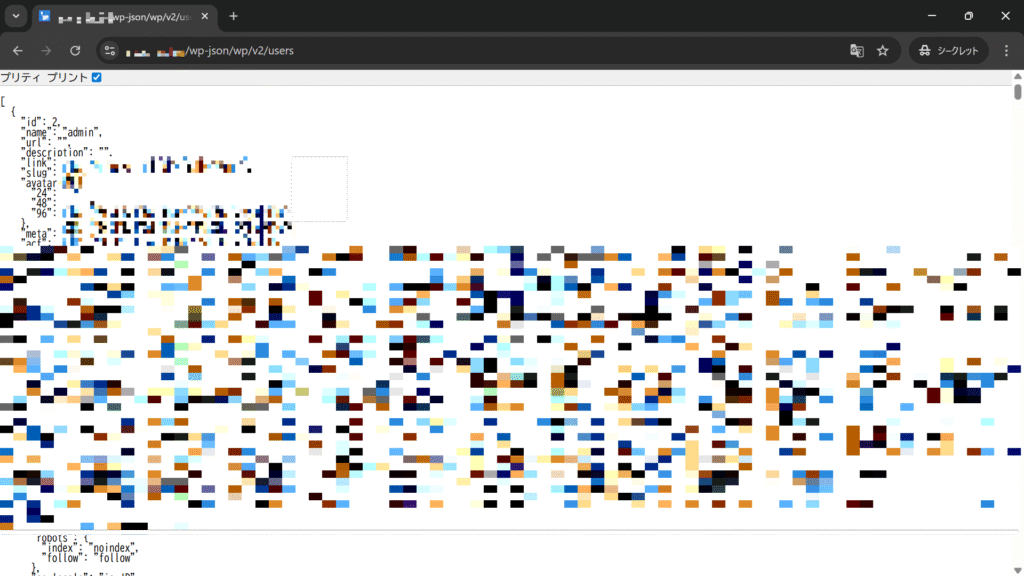
正直私もわかりません。というのも、もはや公式リファレンスにも載っていないエンドポイントが増えすぎていて、私でも把握しきれてません。とりあえず動作する程度にブロックするなら、「ブロック対象 REST API エンドポイント」で「users」は塞ぐべきでしょう。例えばある会社の公式ウェブサイトは、このように特定のパラメータを投げるだけでログインできるユーザーの一覧が見えてしまいます。
逆に対策されているウェブサイトはしっかりと対策されています。
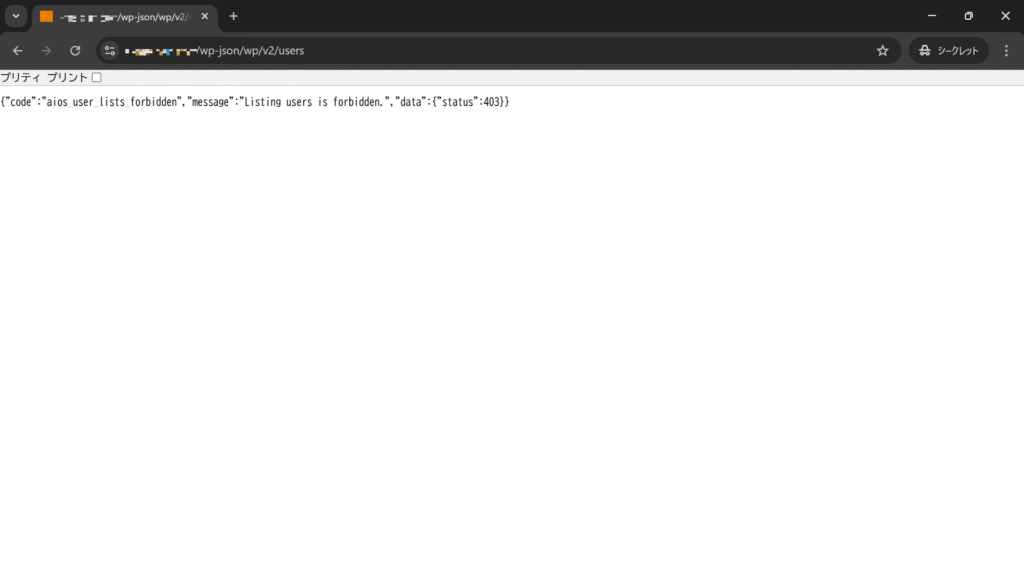
結構大手のウェブサイトでも、この穴付くと社員情報が見れちゃったりするので、なるべく早いうちに本邦での対策が進むことを強く祈ります。この先は単なる問題提起になります。