

脱functions.phpの思想が広まることを祈っています。冒頭からいきなり・・・ですが、ググるとよく「functions.phpに~を記載して~」と出ますが、個人的には好きじゃないやり方です。テーマをアップロードするだけできれいに吹き飛びます。子テーマにするという手もあるのですが、いずれにしろfunctions.phpが延々と長くなっていくだけなので、テーマで提供する機能とプラグインで提供できる機能は割り切りましょう。というわけで今回のプラグインです。
author=1を叩くのを禁止するだけでは不十分?
あまりにも有名な話ですし、対策済みのサイトは多々見かけますし、なんなら最近ではテーマの機能として禁止されていたりもするのですが、逆手に考えれば、author=1問題の本質は「管理者名がわかってしまう」ということです。確かにセキュリティ上よろしいものではありませんね。ですが、迂回路はいくつかあって、RSS経由で閲覧とか、wp-json経由で閲覧するなど抜け穴は多々あります。なのでまとめて潰しましょう慈悲はない。
Feed Access Controller

これはRSSフィード(feed|rss2|atom|rdf|comments/feed|comment-rss)へのアクセスを一括禁止するプラグインです。ソースコードの一部はこうなっています。
function fac_block_feed_access() {

	if ( ! is_feed() ) {
		return;
	}

	// 設定キャッシュ(パフォーマンス向上)
	static $fac_settings = null;
	if ( null === $fac_settings ) {
		$fac_settings = array(
			'block_all'     => get_option( 'fac_block_feed_access', '1' ) === '1',
			'allow_home'    => get_option( 'fac_allow_home_feed', '0' ) === '1',
			'whitelist_raw' => (string) get_option( 'fac_allowed_feed_routes', '' ),
			'error_code'    => absint( get_option( 'fac_feed_error_code', '403' ) ),
			'error_message' => (string) get_option( 'fac_feed_error_message', __( 'Feed access is denied.', 'feed-access-controller' ) ),
		);
	}

	if ( ! $fac_settings['block_all'] ) {
		return;
	}

	// --- URLパスの安全な抽出 ---
	$request_uri = isset( $_SERVER['REQUEST_URI'] ) ? sanitize_text_field( wp_unslash( $_SERVER['REQUEST_URI'] ) ) : '';
	$parsed_url  = wp_parse_url( $request_uri );
	$request_path = isset( $parsed_url['path'] ) ? $parsed_url['path'] : '';

	// feedパターン除去 (/feed/, /rss2/ など)
	$request_path = preg_replace( '#/(feed|rss2|atom|rdf|comments/feed|comment-rss)(/)?$#i', '', $request_path );
	$request_path = trim( untrailingslashit( $request_path ), '/' );

	// --- トップページfeedの許可設定 ---
	if ( $request_path === '' && $fac_settings['allow_home'] ) {
		return;
	}

	// --- ホワイトリストマッチング ---
	$allowed_routes = array_filter(
		array_map( 'trim', explode( "\n", strtolower( $fac_settings['whitelist_raw'] ) ) )
	);

	$current = strtolower( $request_path );
	foreach ( $allowed_routes as $route ) {
		$route = trim( untrailingslashit( $route ), '/' );
		if ( $route === '' ) {
			continue;
		}
		if ( $current === $route || strpos( $current, $route . '/' ) === 0 ) {
			return; // 許可済みルート
		}
	}

	// --- ブロック処理 ---
	status_header( $fac_settings['error_code'] );
	wp_die(
		esc_html( $fac_settings['error_message'] ),
		esc_html__( 'Feed Access Restricted', 'feed-access-controller' ),
		array( 'response' => absint( $fac_settings['error_code'] ) )
	);
}
add_action( 'template_redirect', 'fac_block_feed_access', 0 );通常だとこのように記事の一覧が見えますが、これをインストールして有効化すると、明示的にホワイトリストに追加しない限りこうなります。
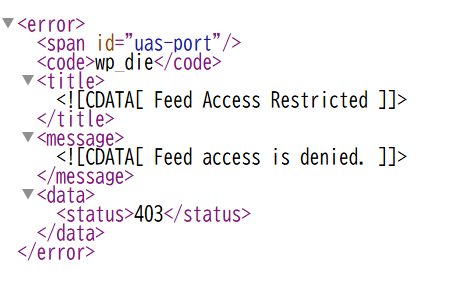
別にその位見えても…と言われればそれまでですが、RSS自体の需要が減る中でわざわざ放置しっぱなしにするメリットも少ないでしょう。次にauthor=1もオマケで潰してみます
author=1でカスタムエラーを返す
author=1の問題は、テーマで投稿者一覧が有効な場合はサイトの管理者が一発で見えてしまうことです。当サイトなどはカスタムスラッグを使って投稿者のIDを隠匿してるので別に困ることもないのですが、直で叩かれるのはあまりいい気分がしません。潰します(無慈悲)。
function aac_block_author_query( $query ) {
	// 管理画面では無効化
	if ( is_admin() ) {
		return;
	}

	// authorパラメータが存在する場合に即時処理
	// @codingStandardsIgnoreStart
	if ( isset( $_GET['author'] ) ) {
	// @codingStandardsIgnoreEnd
		$mode = get_option( 'aac_mode', 'redirect_top' );

		if ( 'allow' === $mode ) {
			return;
		}

		if ( 'redirect_top' === $mode ) {
			wp_safe_redirect( home_url() );
			exit;
		}

		if ( 'error_json' === $mode ) {
			$name    = sanitize_text_field( get_option( 'aac_error_name', 'forbidden_author_access' ) );
			$message = sanitize_text_field( get_option( 'aac_error_message', 'Access denied.' ) );
			$status  = absint( get_option( 'aac_error_status', 403 ) );

			nocache_headers();
			header( 'Content-Type: application/json; charset=utf-8', true, $status );

			echo wp_json_encode(
				array(
					'error' => array(
						'name'    => $name,
						'message' => $message,
						'status'  => $status,
					),
				)
			);
			exit;
		}
	}
}
add_action( 'parse_request', 'aac_block_author_query', 0 );一応JSON形式でエラー吐いて情報を遮断できるようになっています。
ここまで来たらauthorスラッグも変える
車輪を再発明するのはなんとやらですが、他人が作ったものがイマイチ信頼できないクセがあるので、同じくこれも制限しようと思います。論ずるよりコード。
function casc_filter_author_link( $link, $author_id, $author_nicename ) {
	$custom_slug = get_user_meta( $author_id, 'custom_author_slug', true );
	$base        = get_option( 'casc_author_base', 'author' );
	if ( ! empty( $custom_slug ) ) {
		$link = home_url( '/' . $base . '/' . $custom_slug . '/' );
	}
	return esc_url( $link );
}
add_filter( 'author_link', 'casc_filter_author_link', 10, 3 );

function casc_update_author_structure() {
	global $wp_rewrite;

	// 設定された author_base を取得
	$base = get_option( 'casc_author_base', 'author' );

	// sanitize_title()でスラッグを正規化(例: blog/archive/author → blog/archive/author)
	$base = trim( sanitize_text_field( $base ), '/' );

	// Rewriterに反映
	$wp_rewrite->author_base      = $base;
	$wp_rewrite->author_structure = '/' . $base . '/%author%/';

	// フラッシュはパフォーマンス上ここでは行わない
}
add_action( 'init', 'casc_update_author_structure', 20 );

/**
 * =========================================================
 * PART 4: カスタムスラッグ解析 + 非表示チェック(高速化版)
 * =========================================================
 */
function casc_parse_request( $query ) {
	if ( ! isset( $query->query_vars['author_name'] ) ) {
		return;
	}

	global $wpdb;

	$slug = sanitize_title( $query->query_vars['author_name'] );

	// slug が空白の場合はデフォルト動作(404回避)
	if ( empty( $slug ) ) {
		return;
	}

	$cache_key = 'casc_user_' . md5( $slug );
	$user = wp_cache_get( $cache_key, 'casc' );

	if ( false === $user ) {
		// custom_author_slug 検索
		// phpcs:ignore WordPress.DB.DirectDatabaseQuery
		$user_id = $wpdb->get_var(
			$wpdb->prepare(
				"SELECT user_id FROM {$wpdb->usermeta}
				 WHERE meta_key = 'custom_author_slug'
				 AND meta_value = %s
				 LIMIT 1",
				$slug
			)
		);

		if ( $user_id ) {
			$user = get_user_by( 'id', (int) $user_id );
		} else {
			// fallback: nicename で取得
			$user = get_user_by( 'slug', $slug );
		}

		wp_cache_set( $cache_key, $user, 'casc', 3600 );
	}

	// 該当ユーザーが見つからない場合は通常の処理へ
	if ( ! ( $user instanceof WP_User ) ) {
		return;
	}

	$user_id = $user->ID;

	// 非表示設定なら強制404
	if ( get_user_meta( $user_id, 'hide_author_page', true ) ) {
		status_header( 404 );
		nocache_headers();
		include get_query_template( '404' );
		exit;
	}

	$query->query_vars['author'] = $user_id;
	unset( $query->query_vars['author_name'] );
}
add_action( 'pre_get_posts', 'casc_parse_request' );

/**
 * =========================================================
 * PART 6: 非表示ユーザー除外(高速化版)
 * =========================================================
 */
function casc_exclude_hidden_authors( $query ) {
	if ( $query->is_main_query() && ( $query->is_author() || $query->is_home() || $query->is_archive() ) ) {
		global $wpdb;

		$cache_key = 'casc_hidden_users';
		$hidden_ids = wp_cache_get( $cache_key, 'casc' );

		if ( false === $hidden_ids ) {
			// usermeta テーブルを直接検索(meta_query 使用回避)
			// phpcs:ignore WordPress.DB.DirectDatabaseQuery
			$hidden_ids = $wpdb->get_col(
				"SELECT user_id FROM {$wpdb->usermeta}
				 WHERE meta_key = 'hide_author_page'
				 AND meta_value = '1'"
			);
			wp_cache_set( $cache_key, $hidden_ids, 'casc', 3600 );
		}

		if ( ! empty( $hidden_ids ) ) {
			$query->set( 'author__not_in', array_map( 'intval', $hidden_ids ) );
		}
	}
}
add_action( 'pre_get_posts', 'casc_exclude_hidden_authors' );SQL文叩いてんじゃん!と突っ込まれそうですがご安心を。プレースホルダ使っているのと、結局のところWordPressの内部でSQLが処理されるので、脆弱性が起きる余地がありません。もちろん「author=or 1」なんて悪意丸出しの登録…はできません(authorスラッグはサニタイズされる+そもそも$wpdb->usermetaが改ざんされてる状態はWordPress乗っ取られてます。
REST APIはどう潰す?
REST API Shield & XML RPC Blockerを使ってください(公式プラグイン掲載済み)。
ソースコード配布
feed-access-controller(GitHub)
author-access-controller(GitHub)
custom-author-slug-controller(GitHub)
私見
正直なところ、author=1を潰すのは当然として、authorスラッグも変えて、feedも塞いだ状態であれば、投稿者一覧はむしろ公開しても問題ないのでは?とも思います。デフォルト状態での掲載が危険という話で、しっかりとセキュリティ対策をした状態で公開するのであれば問題ないと思います(これらを有効にすると、ブルートフォースしてもauthorスラッグは違うわ、author=1で情報は取れないわ、REST API経由でも情報は取れないわ…という状況下に陥ります)。